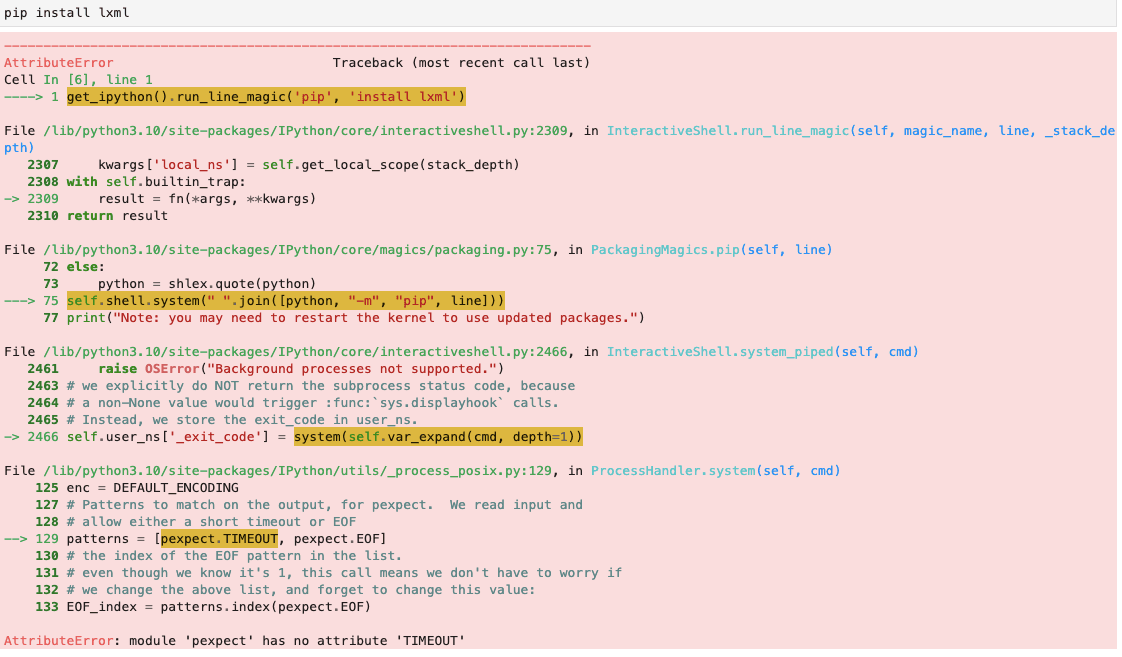
This error means Python imported something that is not the real pexpect module. In a notebook it is usually a stale copy cached in sys.modules from before an upgrade — restart the kernel. Outside a notebook, the usual cause is a local file or directory named pexpect.py shadowing the installed package. Check pexpect.__file__ to see which one Python actually loaded.
Short answer:pexpect.TIMEOUT exists in every modern version, so this almost never means the attribute is really missing — Python imported something that isn't the real pexpect. Run import pexpect; print(pexpect.__file__): if it points into site-packages you have a stale cache (restart the kernel); if it points into your project, a local pexpect.py is shadowing the package — rename it and delete __pycache__.
AttributeError: module 'pexpect' has no attribute 'TIMEOUT'
This almost never means the attribute is genuinely missing — pexpect.TIMEOUT
exists in every modern version. It means Python imported something that is not
the real pexpect module. There are two common causes, and one command tells
you which.
Step 1: find out what actually got imported
import pexpectprint(pexpect.__file__)
If the path is inside site-packages → you have the real library, and the
problem is a stale cache (cause A).
If the path is inside your own project → a local file is shadowing the
real package (cause B).
Cause A: a stale module in a notebook
When you pip install or upgrade inside a running Jupyter kernel, the files on
disk change but the already-imported module stays cached in sys.modules for
the life of the process. Python keeps serving the old object.
Fix: restart the kernel so Python re-imports from disk.
Cause B: a local file shadowing the package
If you have a file named pexpect.py (or a folder named pexpect/) anywhere
earlier on sys.path than site-packages — typically your working directory —
Python imports that instead of the installed library. Your file has no
TIMEOUT, so the attribute lookup fails.
Fix:
Rename your file to something that isn't a package name.
Delete the stale bytecode next to it:
rm -rf __pycache__
A leftover pexpect.cpython-*.pyc can keep the wrong module importable even
after you rename the source.
Step 2: confirm the package is installed in the right interpreter
pip on your PATH may belong to a different environment than the Python you're
running. Check with the interpreter itself:
python -m pip show pexpect
If it prints nothing, install it into that interpreter:
python -m pip install pexpect
A note for Windows users
pexpect.spawn relies on Unix pseudo-terminals and is not available on
Windows — you get pexpect.popen_spawn instead. If you're on Windows and an
attribute is missing, verify it exists on your platform before assuming the
install is broken.
Quick checklist
print(pexpect.__file__) — real package or a local file?
In a notebook after upgrading → restart the kernel.
Path points into your project → rename the shadowing file, delete
__pycache__.
Still failing → python -m pip show pexpect to confirm the right
environment.
•Run `import pexpect; print(pexpect.__file__)` first — the path immediately tells you whether you loaded the real package or a local file.
•If the path points into your project directory rather than site-packages, a file named pexpect.py (or a pexpect/ folder) is shadowing the real package. Rename it.
•In Jupyter, pip install upgrades the files on disk but the old module stays cached in sys.modules — only a kernel restart clears it.
•Also delete any stale __pycache__ directory next to a shadowing file; a leftover .pyc can keep the wrong module importable.
•Confirm the package is installed in the interpreter you are actually running with `python -m pip show pexpect`, not just `pip show pexpect`.
•pexpect.TIMEOUT exists in all modern versions, so a genuinely missing attribute points at a shadowed or partially-installed module rather than a version gap.
Frequently asked questions
Why does 'module pexpect has no attribute TIMEOUT' happen?
Python found and imported a module named pexpect that is not the real library. Either a stale version is cached in sys.modules from before an upgrade, or a local file or directory named pexpect is earlier on sys.path than site-packages and is being imported instead.
How do I check which module Python actually imported?
Run `import pexpect; print(pexpect.__file__)`. If it prints a path inside site-packages, you have the real package and the problem is a stale cache. If it prints a path inside your own project, that file is shadowing the library and must be renamed.
Why does restarting the Jupyter kernel fix it?
Installing or upgrading a package changes files on disk, but any module already imported stays in sys.modules for the life of the process. The kernel keeps serving the old object until it restarts and re-imports from disk.
I renamed the file and it still fails. What else should I check?
Delete the __pycache__ directory beside the renamed file — a stale .pyc can still satisfy the import. Then confirm the package is installed for the interpreter you are running with `python -m pip show pexpect`, since pip on PATH may belong to a different environment.
Does pexpect work on Windows?
Only partially. Core pexpect.spawn relies on Unix pty support and is unavailable on Windows; you get pexpect.popen_spawn instead. If you are on Windows and hitting attribute errors, confirm the attribute you want exists on the platform you are using.