How to excludes files from Angular Unit test code coverage
Quick answer
Add the paths to the codeCoverageExclude array under the test options in angular.json, for example "src/**/*.mock.ts". Excluded files are dropped from the coverage percentage, which is how you keep generated code, mocks, environment files, and polyfills from distorting the number.
To Excludes files from your angular unit test code coverage you need to add this configuration angular.json file of your project.
To remove mock files or a list of files or patterns from ng test --code-coverage
"codeCoverageExclude": ["/**/*mock*.ts", "app/bar/**/*.ts"]you can add this in test property of angular.json file as below.
"test": {
  "options": {
    "codeCoverageExclude": ["/**/*mock*.ts", "app/bar/**/*.ts"]
  }
}
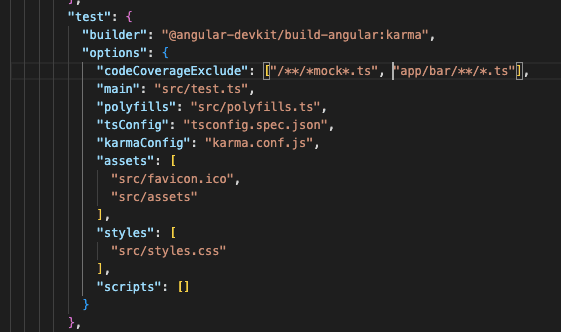
For example to remove mock files you can add this "/**/*mock*.ts" in codeCoverageExclude array and it will remove from testing this file and code coverage. A list of files or patterns can be excluded from code coverage via the codeCoverageExclude property.
Related: see the Angular unit testing with Jasmine and Karma guide for how this fits with the rest of the toolchain.

Software Engineering Leader & Technical Author · Updated July 21, 2026