Quick answer
Firebase error 400 with the message CONFIGURATION_NOT_FOUND during authentication almost always means the sign-in method you are calling is not enabled for the project. Open the Firebase console, go to Authentication, then Sign-in method, and enable the provider (Email/Password, Google, and so on). If the provider is already enabled, the other causes are: the client is initialised with the wrong projectId/apiKey (so it hits a project where the provider isn't set up), the Identity Toolkit API is disabled in the underlying Google Cloud project, or you are pointing at the Auth emulator without having started it.
Short answer: CONFIGURATION_NOT_FOUND (HTTP 400) from Firebase Auth means the identity configuration it looked up does not exist for your request. In the vast majority of cases the sign-in provider you are calling is not enabled. Enable it under Authentication → Sign-in method. If it is already enabled, you are almost certainly pointed at the wrong project (mismatched apiKey/projectId), the Identity Toolkit API is disabled, or you are hitting a stopped Auth emulator.
You typically see this while calling an auth method — signInWithEmailAndPassword, createUserWithEmailAndPassword, signInWithPopup, or an Admin SDK call:
{
  "error": {
    "code": 400,
    "message": "CONFIGURATION_NOT_FOUND"
  }
}
The message is blunt: Firebase went to look up the configuration needed to serve your request and didn't find it. Here are the causes, in the order they actually occur.
Cause 1 — the sign-in method is not enabled (most common)
A fresh Firebase project has every provider disabled. Calling signInWithEmailAndPassword before enabling Email/Password returns CONFIGURATION_NOT_FOUND.
Fix it in the console:
- Open the Firebase console and pick your project.
- Go to Build → Authentication. If you have never opened it, click Get started once.
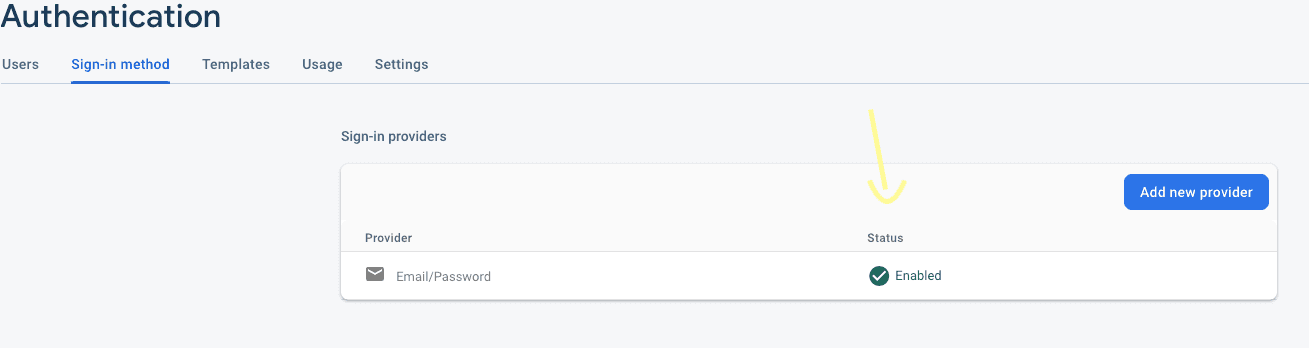
- Open the Sign-in method tab.
- Enable the provider you are using — Email/Password, Google, Anonymous, etc. — and Save.
Cause 2 — the client points at the wrong project
If the provider is enabled but you still get the error, your app config is for a different project than the one you configured. The apiKey and projectId must belong to the project where the provider is enabled:
import { initializeApp } from "firebase/app"

const app = initializeApp({
  apiKey: "AIza...",            // must match the project below
  authDomain: "my-app.firebaseapp.com",
  projectId: "my-app",          // the project where Email/Password is enabled
})
Copy these values straight from Project settings → Your apps rather than hand-editing them. A stale apiKey from an old project is the usual trap here.
Cause 3 — the Identity Toolkit API is disabled
Firebase Auth is backed by Google Cloud's Identity Toolkit API. It is normally enabled automatically, but if it was manually disabled (or the project was created by an unusual flow) every auth call fails with CONFIGURATION_NOT_FOUND. Re-enable it:
- Open the Identity Toolkit API page in the Google Cloud console, select the same project, and click Enable.
Cause 4 — you are hitting a stopped Auth emulator
In local development this error frequently means your code is routed to the emulator, but the emulator isn't running. Check for either of these and start the emulator (firebase emulators:start) or remove the connection:
// Client SDK
connectAuthEmulator(auth, "http://127.0.0.1:9099")

// Admin SDK / server — set by the CLI, but sometimes left in the environment
process.env.FIREBASE_AUTH_EMULATOR_HOST // e.g. "127.0.0.1:9099"
Quick checklist
- Provider enabled under Authentication → Sign-in method? (start here)
apiKeyandprojectIdcopied from the same project's settings?- Identity Toolkit API enabled in Google Cloud for that project?
- Not accidentally connected to a stopped Auth emulator?
Work down that list and CONFIGURATION_NOT_FOUND resolves in almost every case.
Related guides
Sources
Key takeaways
- •CONFIGURATION_NOT_FOUND (HTTP 400) from Firebase Auth means the identity configuration it looked for does not exist — usually the sign-in provider is not enabled.
- •Primary fix: Firebase console, then Authentication, then Sign-in method, then enable the provider (Email/Password, Google, and so on).
- •Second cause: the client config points at the wrong project — confirm apiKey and projectId match the project where the provider IS enabled.
- •Third cause: the Identity Toolkit API is disabled for the Google Cloud project behind Firebase — enable it in the Cloud console.
- •Fourth cause (local dev): you set FIREBASE_AUTH_EMULATOR_HOST or connectAuthEmulator() but the emulator isn't running.
Frequently asked questions
What causes Firebase 400 CONFIGURATION_NOT_FOUND?
Firebase Auth looked up the identity configuration for your request and found none. The common cause is that the sign-in provider you are using is not enabled in the project's Authentication settings, but it also appears when the client targets the wrong project, when the Identity Toolkit API is disabled, or when you point at the Auth emulator without starting it.
How do I fix it?
Enable the provider under Authentication then Sign-in method in the Firebase console. If it is already enabled, verify your apiKey and projectId belong to that same project, confirm the Identity Toolkit API is enabled in Google Cloud, and make sure you are not accidentally connected to a stopped Auth emulator.
Why do I get CONFIGURATION_NOT_FOUND only on the server (Admin SDK)?
The Admin SDK operation you are calling (for example verifying a session cookie or creating a custom token) needs the corresponding feature configured on the project. Ensure the service account belongs to the correct project and that Authentication has been initialised for that project at least once in the console.

Software Engineering Leader & Technical Author · Updated September 9, 2026